Have you needed to complete a CMA for your buyers? The new Buyer CMA functionality will make the process even faster with a few clicks!
You will be able to start a Buyer CMA in two places:
From an Active Listing
When you have a listing open for review, you will be able to begin a Buyers CMA from the listing page.
To start, click on the Blue Actions button in the top right hand corner.
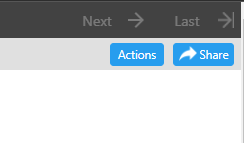
A pop up screen will open. You will see the new option, Buyers CMA, as highlighted below.
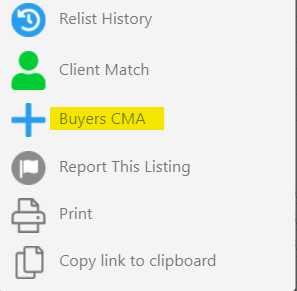
A new tab will open into step 1 of the CMA wizard. You can now complete the CMA as you would a Sellers CMA.
From the CMA tab
The second option to start a Buyers CMA is from the CMA tab.
When you load the CMA tab, you will now see 2 CMA options, the Buyers CMA on the left, as noted below, and the traditional Seller CMA on the right.
You will also see a new column, as noted below, that will indicate to you the type of CMA you have active.
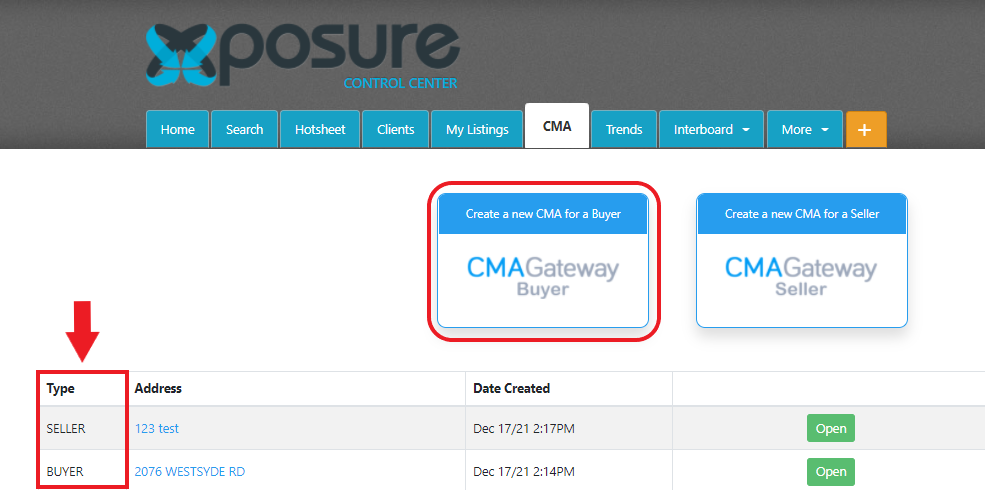
The process of completing the Buyers CMA is the same 5 steps as a Sellers CMA. Watch the webinar schedule for an upcoming webinar on the CMA wizards in early 2022.