When your client is logged into their PCS™ account, they will see Acronyms and color-coded building icons under the listings thumbnail photo.
Acronyms
NQ = Newly Qualified
When a listing is tagged NQ, it means the listing has been on the market so it isn't a "new listing". It is a listing that had something change in it or the search criteria for the client changed and the listing is "new" to their search results, so "newly qualified" to match.
Green PC = New & Price Change
A new listing has had a price adjustment.
BOM = Back on Market
The listing may have had a conditional sale collapse, or been paused and now returned with the same MLS number.
OM = Off Market
The listing has been removed from the market. The client will not see why it was removed but could be a cancellation or an expiry.
Icons
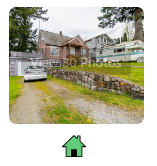
The icons themselves will change depending on the type of property, for example, a home as shown represents a single-family, detached home.
The colors shown below can also depend on the board's listings status. For example, some boards do not have a listing status of an unconditional sale, and therefore will not have a yellow icon.
 Green = Active Listing
 Yellow = Unconditional Sale
 Red = Sold Listing
 Expired = Off Market
 Canceled = Off Market
 Inactive/Suspended
For an article with the agent facing icons, please see this article.